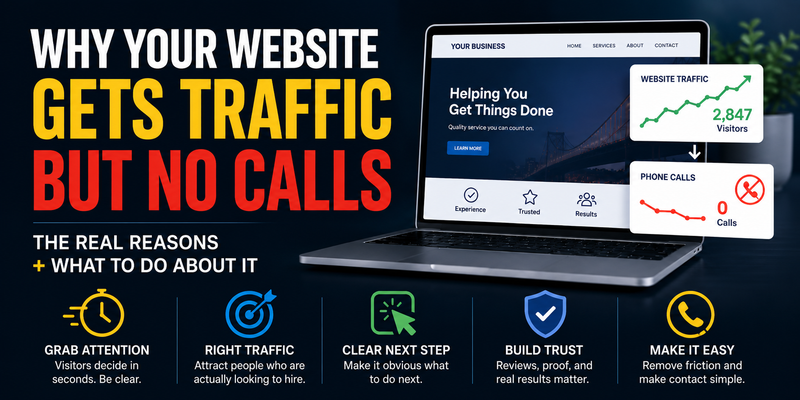
Why Your Website Gets Traffic But No Calls

You check your analytics and the numbers look reasonable — people are visiting your site. But the phone isn’t ringing. The contact form sits empty. You’re getting traffic, just not customers. This is one of the most common and frustrating problems small business owners run into online. Here’s exactly why it happens, and what to do about it.
Traffic and Leads Are Two Different Things
Before diving into the fixes, it helps to understand why this problem is so common. Most people think of a website’s job as “getting found.” So they focus on SEO, social media, maybe some ads — all in service of getting more people to the site. Traffic goes up. But leads don’t follow.
The reason is that getting found and getting hired are two completely separate problems. Traffic is about visibility. Leads are about trust and clarity. A site can be excellent at one and terrible at the other. Most small business websites are built to look good — not to convert. Understanding that distinction is the starting point for fixing it.
Here are the most common reasons your site is getting visits but not calls — and what to do about each one.
1. Visitors Don’t Know What You Do Within 5 Seconds
When someone lands on your homepage, they make a snap judgment in seconds. If they can’t immediately understand what you do, who you help, and where you operate — they leave. Not because they’re impatient, but because they have options. There are other results below yours on Google, and they’ll try the next one.
This is called “above the fold” — the part of the page visible before you scroll. Most small business homepages waste this prime real estate on vague taglines, animated slideshows, or generic welcome messages that say nothing specific.
“Welcome to our website. We are committed to excellence in everything we do.”
“Custom-coded websites for small businesses in Toronto. Starting at $200/mo. No WordPress, no templates.”
The second version tells you exactly what the business does, who it’s for, where it operates, and what makes it different — in one sentence. A visitor who needs that service immediately knows they’re in the right place.
Fix: Rewrite your homepage headline so it answers three questions: What do you do? Who do you help? Where are you? Then make sure a clear call to action (a phone number or “Get a Quote” button) appears on the same screen — before any scrolling required.
2. You’re Attracting the Wrong Traffic
Not all website visitors are potential customers. If you’re ranking for broad or informational keywords — the kind people search when they’re learning, not buying — your traffic numbers will look healthy while your leads stay flat.
For example: a web design agency might rank for “what is a responsive website” and get thousands of monthly visits from students, developers, and curious browsers. None of them are potential clients. Meanwhile, “web design agency Toronto” or “custom website for small business” gets far fewer searches — but nearly everyone who types it is actively looking to hire someone.
This is the difference between informational intent and commercial intent. Traffic from informational searches builds brand awareness at best. Traffic from commercial searches is what fills your pipeline.
Fix: Look at which pages are driving your traffic in Google Search Console. If most of your visits come from blog posts or broad topics, that’s a signal your service pages aren’t ranking. Focus your SEO efforts on location-based and service-specific keywords: “[service] in [city],” “[service] near me,” “best [service] [city].“
3. There’s No Clear Next Step
A visitor who’s interested in your service won’t automatically know what to do next. They need to be told — clearly, repeatedly, and at the right moments. This is what a call to action (CTA) does.
Many small business websites have one CTA buried at the bottom of the page, or a generic “Contact Us” link in the navigation. That’s not enough. By the time a visitor reaches the bottom of your page, they’ve either decided to reach out or they haven’t. You want to give them opportunities to convert at multiple points: after your intro, after you describe your services, after your testimonials.
The CTA also needs to be specific. “Contact Us” is weak. “Get a Free Quote” or “Call (437) 580-9404 Today” is actionable. Tell people exactly what will happen when they click.
Fix: Add a prominent CTA button above the fold, after each major section, and at the bottom of every page. Use your phone number as the primary CTA on mobile — clicking a phone number on a smartphone calls directly, which removes all friction.
4. Your Site Doesn’t Build Trust
People don’t call businesses they don’t trust. And on the internet, trust is built through signals — things visitors can see that prove you’re legitimate, experienced, and worth hiring.
If your website has no testimonials, no portfolio, no reviews, no photos of real people or real work, and no specific information about who’s behind the business — visitors have nothing to anchor their trust to. They’re being asked to hand over their money or their time to a faceless entity, and most people won’t do that.
This is especially true for service businesses where the stakes are higher. Someone hiring a roofer, a lawyer, a financial advisor, or a web agency is making a meaningful commitment. They want to see evidence that others have done it and been happy.
Fix: Add real testimonials with names and businesses attached. Show photos of your work, your team, or your process. If you have Google reviews, link to them. Even a short paragraph about who you are and how long you’ve been doing this goes a long way. Social proof is the single highest-leverage change most small business sites can make.
5. Your Contact Process Has Too Much Friction
Even a visitor who’s ready to hire you can be lost if reaching out is inconvenient. Every extra step between “I want to contact this business” and “I’ve submitted my information” is an opportunity to lose them.
Common friction points include: contact forms that ask for too much information, no phone number visible on mobile, a contact page that’s hard to find in the navigation, forms that don’t work on certain browsers, or no confirmation message after submitting so people don’t know if it went through.
Fix: Put your phone number in your header — visible on every page, clickable on mobile. Keep your contact form short: name, email, phone, and one question about what they need. Add a confirmation message after submission. And test the form yourself from a mobile device to make sure the experience is smooth.
6. Your Site Is Slow on Mobile
More than 60% of local searches happen on mobile devices. If your site takes 4–6 seconds to load on a phone, a significant portion of your visitors leave before they’ve read a single word. They don’t know your business is good. They don’t know you have great reviews. They saw a slow white screen and left.
This is especially damaging because mobile visitors searching for local services are often high-intent. They’re looking for a plumber right now, a restaurant for tonight, a contractor for a project they’ve been putting off. Losing them to a slow site is losing someone who was actively ready to hire.
Fix: Test your site on Google PageSpeed Insights and check your mobile score specifically. If it’s below 70, speed should be a priority. Common culprits are large uncompressed images, too many plugins (on WordPress), and bloated theme code. See our full guide on why websites are slow and how to fix them.
7. Your Service Pages Are Too Vague
A visitor comparing you to a competitor needs enough information to make a decision. If your services page says “We offer web design, SEO, and marketing” with no further detail — prices, process, timelines, what’s included, who it’s for — they have nothing to evaluate you on. They’ll go to the next result, which might have a clearer answer.
Specificity builds confidence. A page that says “We build 5-page hand-coded websites for small businesses, starting at $200/month, with hosting, unlimited edits, and 24/7 support included” gives a prospect everything they need to know if you’re a fit. A page that says “We create beautiful websites tailored to your needs” tells them nothing.
Fix: For each service you offer, write a dedicated section or page that answers: What is it exactly? Who is it for? What does it include? How much does it cost (or at minimum, what’s the starting price)? What happens after they contact you? Specificity removes the uncertainty that stops people from reaching out.
8. You’re Not Targeting Your Local Area
For a local service business, most of your customers come from a specific geography. But many small business websites don’t mention their city, neighbourhood, or service area beyond a footer line. That’s a missed opportunity — both for Google rankings and for visitor confidence.
When someone searching “web design Toronto” lands on a page that clearly says “serving Toronto and the GTA,” they immediately know you’re relevant. When they land on a generic page that could be from anywhere, there’s a moment of uncertainty — “do these people actually serve my area?” — that creates friction.
Fix: Mention your city and service area in your headline or subheading, in your body copy, and in your page title and meta description. If you serve multiple areas, consider dedicated location pages for each (as we do with our Toronto, Vaughan, Mississauga, and other GTA pages).
The Honest Summary
Traffic without leads usually means one of two things: you’re attracting the wrong visitors, or you’re failing to convert the right ones. Both are fixable — but they require different solutions.
Wrong traffic is an SEO and content problem. You’re ranking for keywords that don’t match buying intent. Fix that by targeting commercial, location-specific terms and making sure your service pages are optimized for them.
Poor conversion is a design and messaging problem. Your site isn’t building trust, isn’t clear about what you do, isn’t making it easy to get in touch, or isn’t giving visitors a reason to choose you over the next result. Fix that by improving your headline, adding social proof, simplifying your contact process, and making your CTAs specific and prominent.
Most small business sites have both problems to some degree. Start with the conversion issues — they’re faster to fix and don’t require months of SEO work. A clearer homepage and a visible phone number can make a measurable difference in days.
Quick Conversion Checklist
- ☐ Does your homepage tell visitors what you do, who you help, and where — above the fold?
- ☐ Is your phone number visible in the header on every page?
- ☐ Do you have at least one testimonial or review visible on your homepage?
- ☐ Is there a clear CTA button after each major section of your homepage?
- ☐ Does your contact form work correctly on mobile?
- ☐ Does your mobile PageSpeed score exceed 70?
- ☐ Do your service pages include specific details about pricing, inclusions, and process?
- ☐ Does your site mention your city or service area prominently?
Need Help Turning Your Traffic Into Leads?
At AZP Systems, we build websites designed to convert — not just to look good. Every site we build is structured around clear messaging, trust signals, fast load times, and prominent calls to action, because a website that doesn’t bring in customers isn’t doing its job.
If your current site is getting visitors but not leads, we’re happy to take a look and give you an honest read on what’s holding it back.