

How Google Decides Which Websites to Show First
If you’ve ever Googled your own business and wondered why a competitor shows up above you — or why you don’t show up at all — this post is for you. Google’s ranking algorithm has over 200 known factors, but for a small business owner, only a handful of them actually move the needle. Here’s a plain-English explanation of what matters, what doesn’t, and what you can actually do about it.
First: What Google Is Actually Trying to Do
Google’s goal is simple to state and complex to execute: show the most useful, relevant, and trustworthy result for any given search. That’s it. Not the most popular result, not the one that paid the most, not the one with the fanciest website. The one that most accurately answers what the person typed.
Everything Google’s algorithm does is in service of that goal. Which means that if you understand what “useful, relevant, and trustworthy” looks like to Google — and build your site accordingly — you’re working with the algorithm, not against it.
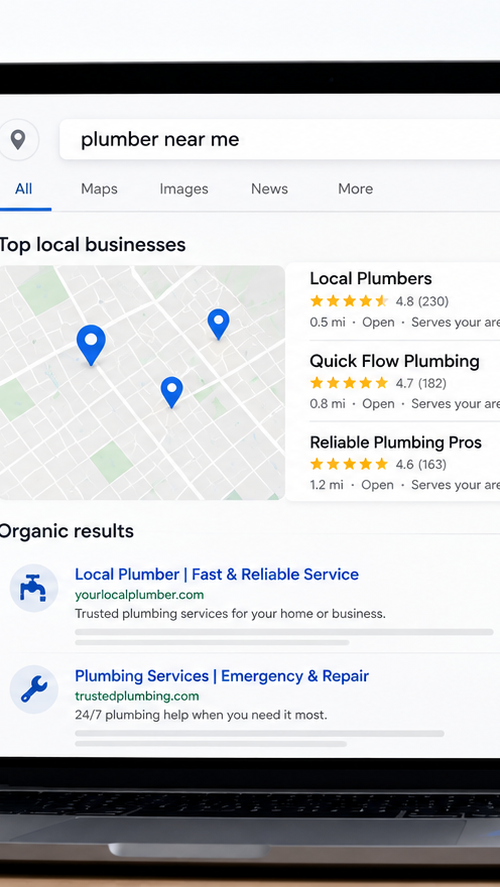
There are two distinct types of search results a local business can appear in, and they work slightly differently:
The Map Pack
The block of three local businesses that appears with a map — usually right below the ads. This is driven primarily by your Google Business Profile and local signals. Getting into the Map Pack for your main service keywords is often the highest-value SEO goal for a local business.
Organic Results
The regular website links below the Map Pack. These are driven by your actual website — its content, speed, authority, and structure. Ranking in organic results for local terms compounds over time and is less dependent on Google Business Profile management.
Most small businesses should focus on both. A strong GBP gets you into the Map Pack. A well-built website gets you into organic results. Together, they give you two chances to appear on page one for any given search.
The Eight Factors That Actually Matter
Google has confirmed over 200 ranking signals exist. Most of them are minor or apply to large publishers rather than small business sites. These eight are the ones that meaningfully affect where a local small business ranks:
🎯 Factor 01
Relevance
Does your page match what the person searched for?
Google’s first question about any page is whether it’s relevant to the search. This sounds obvious, but relevance is more nuanced than just having the right keywords. It includes whether your page’s title, headings, and content match the searcher’s intent — not just their words. A page titled ‘Web Design Services’ is less relevant to ‘web designer Vaughan’ than a page titled ‘Web Design in Vaughan for Small Businesses.’ It also includes whether your Google Business Profile, your location pages, and your site content all consistently signal the same service area and service type.
⚡ Factor 02
Page Speed & Core Web Vitals
How fast and smooth is your site to use?
Google has made performance a direct ranking factor through its Core Web Vitals — a set of measurements that assess how fast your page loads, how stable the layout is as it loads, and how quickly it responds to user input. A site that loads slowly, shifts elements around as images appear, or freezes momentarily when you tap a button will score poorly on these metrics and rank accordingly. This is particularly punishing on mobile, where Google primarily evaluates your site. A hand-coded site with no unnecessary scripts or plugin bloat has a significant natural advantage here over a WordPress or page-builder site.
📱 Factor 03
Mobile-First Indexing
Google ranks you based on your mobile site, not your desktop one.
Since 2023, Google indexes and ranks the mobile version of your site first. Your desktop site is essentially secondary. This matters enormously for small businesses whose sites were built five or more years ago, or who built on a platform that prioritizes desktop design. If your mobile experience is slow, hard to navigate, or missing content that’s on your desktop version, your rankings suffer across all devices — not just on mobile. Run your site through Google PageSpeed Insights and look at the mobile score. That number is the one that matters most.
📝 Factor 05
Content Quality & Depth
Is your content genuinely useful, or does it just exist?
Google has become significantly better at distinguishing thin, generic content from content that’s actually useful to a reader. A services page that says ‘We offer professional web design services tailored to your needs’ provides almost no information that helps Google understand who you are or what you do. A services page that explains your specific process, your pricing range, your service area, who you typically work with, and what clients can expect gives Google something real to evaluate — and gives visitors a reason to stay. Content depth matters too. A 300-word page on a competitive topic won’t rank as well as a thorough, specific, genuinely helpful page on the same topic.
📍 Factor 06
Local Signals
Does Google know where you are and who you serve?
For local businesses, Google needs to understand your geography. This comes from multiple sources: your Google Business Profile and the cities listed in your service area, mentions of specific neighbourhoods and cities in your page content, consistent NAP (name, address, phone) information across your site and the web, and location-specific pages for each area you serve. A generic services page with no location signals competes against every other web designer on the internet. A page specifically about ‘web design in Brampton’ with Brampton-specific content competes only against the much smaller pool of businesses targeting that term. Local specificity is one of the fastest ways to improve rankings for a small business.
👆 Factor 07
User Behaviour Signals
What do visitors do once they land on your page?
Google watches what happens after someone clicks your site from a search result. Do they stay and engage, or do they immediately hit back and choose a different result? If visitors bounce quickly — what’s called a ‘pogo-stick’ — Google treats that as a signal that your page didn’t match what they were looking for and may demote it. A site that loads slowly, looks unprofessional, has confusing navigation, or doesn’t immediately answer the searcher’s question will lose visitors fast. Conversely, a site that keeps visitors engaged — through clear content, fast loading, and a good mobile experience — reinforces its position in the rankings over time.
⭐ Factor 08
Reviews & Trust Signals
Do customers trust your business enough to leave reviews?
For local search specifically, Google Business Profile reviews are a significant ranking factor — both in the Map Pack (the local results with the map) and in regular search results. The quantity, recency, and content of your reviews all matter. A business with 50 recent, specific reviews will consistently outrank a business with 5 old reviews, even if the underlying quality of work is the same. Reviews also contain natural keyword signals — when clients describe your services in their own words, they often include terms that reinforce your relevance for related searches.
What Doesn’t Matter (As Much As People Think)
A few things that get a lot of attention in SEO circles but have minimal impact for local small businesses:
- Meta keywords tag — Google has ignored this tag for over a decade. It does nothing for rankings.
- Keyword density — Stuffing a keyword into your content 20 times doesn’t help and can actually hurt. Write naturally for humans and mention your service and location where it makes sense.
- Social media activity — Your Instagram posts and Facebook likes don’t directly affect Google rankings. Social platforms can drive traffic, but they’re not a ranking signal.
- Domain age — A newer domain can rank just as well as an older one. What matters is what you build on it, not how long it’s existed. How many pages your site has — Ten well-written, useful pages will outrank a hundred thin, generic ones every time.
What This Looks Like in Practice
Say you’re a contractor in Vaughan searching for “renovation contractor Woodbridge.” Here’s what Google is evaluating in roughly the order it matters:
Which businesses have a Google Business Profile that lists Woodbridge or Vaughan in their service area, and has a primary category of “General Contractor” or similar?
Of those, which have the most recent and most numerous reviews — particularly those that mention renovation work in Vaughan or Woodbridge?
Which have a website that loads fast on mobile, has a page specifically about renovation services in Vaughan, and uses those terms naturally in the page content?
Which have inbound links from other local sites — directories, suppliers, past clients — that reinforce their local relevance and authority?
When previous searchers have clicked on these results, which ones kept them engaged vs. sent them back to the search results immediately?
The business that wins across most of these factors gets the top spot. It’s rarely one thing — it’s the combination.
The Honest Truth About How Long It Takes
SEO takes time. A brand-new website won’t rank on page one for competitive terms the week it launches — typically it takes three to six months to see meaningful movement on competitive keywords, and longer for the most saturated markets.
The good news for GTA small businesses: most local markets outside of Toronto’s core are not that competitive. In cities like Oshawa, Whitby, Ajax, Pickering, and even Vaughan and Brampton, the number of well-optimized local competitors is low enough that a properly built site can start appearing in search results meaningfully within weeks, not months.
And the foundational work — building a fast site, setting up a GBP, getting directory listings, collecting reviews — is cumulative. Every month you’re doing it, the position gets stronger. Every month a competitor isn’t, the gap grows.
What to Do First
Here’s a practical starting sequence based on what moves the needle fastest for a GTA small business:
- Claim and fully complete your Google Business Profile — categories, service area, phone, description, photos. This is the fastest path to the Map Pack.
- Get more Google reviews — ask every happy client. Even five to ten new reviews can visibly shift your Map Pack position.
- Make sure your site is fast on mobile — run pagespeed.web.dev and fix anything below 70 on mobile.
- Add location signals to your pages — mention your city and service area naturally in your homepage, services page, and meta descriptions.
- Get listed in key directories — Clutch, Yellow Pages, Yelp, BBB. Each one is a backlink and a citation that reinforces your local presence.
- Create content that answers the questions your clients actually ask — posts like this one build topical authority over time and attract the kind of links that compound your rankings.
Want to Know Where Your Site Stands?
We’ll take a look at your current site and GBP, run the key tests, and give you a plain-English breakdown of what’s working and what’s holding you back. No jargon, no obligation.