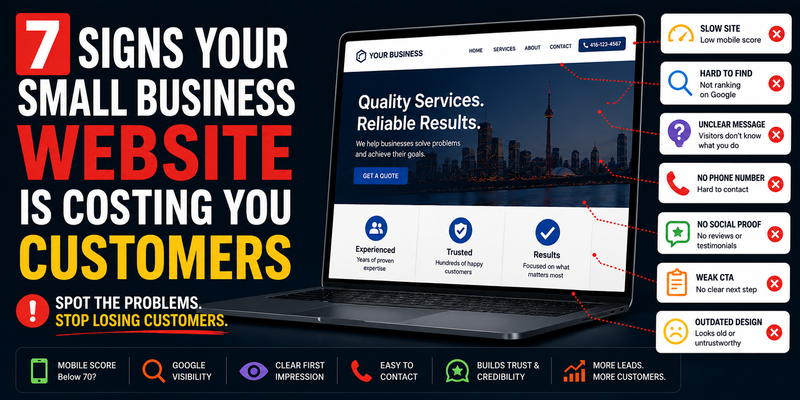
7 Signs Your Small Business Website Is Costing You Customers

Most business owners assume their website is fine. It loads, it looks okay, it has the right pages. What they don’t see is the visitor who bounced after three seconds on mobile, the referral who Googled them and moved on, or the lead who filled out a contact form that never sent. A website can look fine and still underperform badly. Here are seven specific signs yours might be one of them — and a self-test you can run right now for each one.
Before you read: open your website on your phone right now, in a private browser window. Keep it open as you go through this list. Several of the tests below you can run immediately.
01
Your Mobile Score Is Below 70
🔍 SELF-TEST
Go to pagespeed.web.dev, enter your URL, and look at the mobile score specifically — not desktop.
⚠️ WHAT IT MEANS
Below 50 means serious problems. 50–69 means meaningful room to improve. Either way, you’re losing visitors.
More than 60% of local searches happen on mobile. If your site takes 4 seconds to load on a phone, over half of those visitors leave before they read a word. They don’t know you have good reviews. They don’t know your prices are fair. They saw a white screen and left. Google also uses your mobile score as a ranking factor — a slow mobile site gets pushed down in search results, so fewer people find you in the first place. It’s a double loss: fewer visitors, and the ones who do show up are more likely to bounce.
02
You Can’t Find Yourself on Google
🔍 SELF-TEST
Open a private browser window (important — this removes your search history from the results) and search for what you do plus your city. Try variations: ‘web designer Toronto’, ‘Toronto web design’, ‘web design company Toronto’.
⚠️ WHAT IT MEANS
If you’re not on page one for at least one of these, most of your potential customers will never know you exist. The first page of Google gets over 90% of all clicks. Page two is effectively invisible.
A website that can’t be found isn’t doing its job, regardless of how good it looks. Most sites that don’t rank have the same underlying problems: no location signals in the page content, missing or thin meta descriptions, slow load times that hurt Core Web Vitals scores, or no meaningful content for Google to index. The good news is that local search — especially in smaller GTA cities like Vaughan, Whitby, or Ajax — is far less competitive than national keywords. A technically sound, locally optimized site can make meaningful progress here faster than most business owners expect.
03
Your Homepage Doesn’t Pass the Five-Second Test
🔍 SELF-TEST
Ask someone who doesn’t know your business to look at your homepage for five seconds, then close it. Ask them: what does this business do? Who do they help? Where are they located? If they can’t answer all three, you failed.
⚠️ WHAT IT MEANS
If the answer to any of those questions is ‘I’m not sure,’ visitors are having the same experience — and unlike your test subject, they won’t tell you. They’ll just leave.
When someone lands on your site from a Google search, they make a snap judgment in seconds. If your headline is vague (‘Welcome to our website’ or ‘Excellence in everything we do’), if there’s no mention of your city, or if the first thing they see is a slow-loading carousel of stock photos — they’re gone. The business down the search results page with a clear headline, a specific service list, and a visible phone number wins that visitor. You can have the best service in Toronto and lose to a worse business that just has a clearer homepage.
04
There’s No Phone Number in Your Header
🔍 SELF-TEST
Pull up your site on your phone. Without scrolling, can you see a phone number? Is it tappable (i.e. clicking it initiates a call)?
⚠️ WHAT IT MEANS
If you have to scroll to find the phone number, or if it’s an image rather than a tappable link, you’re adding friction at exactly the moment someone is ready to contact you.
Local service business customers — especially those searching on mobile — are often ready to call the moment they decide you’re the right fit. Every extra step between ‘I want to contact this business’ and ‘I’m talking to someone’ is an opportunity to lose them. A phone number in the header, visible on every page, clickable on mobile, removes all of that friction. It’s one of the simplest changes you can make and consistently one of the highest-impact.
05
You Have No Testimonials or Reviews on the Site
🔍 SELF-TEST
Look at your homepage and your services page. Is there a single customer name, quote, star rating, or photo of completed work anywhere on either page?
⚠️ WHAT IT MEANS
If the answer is no, you’re asking visitors to trust you based entirely on your own word — which is the weakest possible form of credibility.
People don’t trust businesses they don’t know. On the internet, trust is built through social proof — reviews, testimonials, case studies, photos of real work, names of real clients. Without these, a visitor comparing you to a competitor who does have testimonials will almost always choose the competitor, even if your work is genuinely better. This is especially true for higher-ticket services: a customer deciding on a $5,000 renovation quote or a new web agency isn’t going to take that risk without some evidence that others have done it and been happy. Even one real, detailed testimonial is dramatically better than none.
06
Your Site Looks Like a Template
🔍 SELF-TEST
Google one of your direct competitors. Look at their site, then look at yours. Could you swap the logo and business name between the two sites and have them still make sense? If yes, both sites look like templates.
⚠️ WHAT IT MEANS
If your site is indistinguishable from a generic template, it’s not making an impression — and in a competitive market, neutral is effectively negative.
Template sites look like template sites. A digitally experienced customer — and in markets like Markham, Richmond Hill, or Toronto’s Financial District, that’s most of them — can spot a Wix or Squarespace template in seconds. The impression it creates isn’t neutral: it signals that you didn’t invest in your presentation, which makes people wonder whether you invest in your work. A custom-designed site, by contrast, is immediately distinctive. It looks intentional. It communicates that you take your business seriously. That perception happens before a single word is read.
07
Your Contact Form Doesn’t Work on Mobile
🔍 SELF-TEST
Pull up your contact page on your phone. Fill out the form completely and submit it. Check that you receive the notification email. Do this now if you haven’t recently — form breakage is more common than most business owners realize.
⚠️ WHAT IT MEANS
If the form doesn’t work, doesn’t send you a notification, or is so cumbersome on mobile that you give up halfway through — you’re losing every lead that tried to contact you that way.
A broken contact form is a silent lead killer. Unlike a phone call that doesn’t connect, you have no idea how many people attempted to contact you through a form that wasn’t working. They filled it out, hit submit, saw a blank page or an error, and gave up — or worse, assumed you were unreachable. Beyond outright breakage, contact forms that ask for too much information (full address, company size, budget range, project description) before you’ve given the visitor any reason to trust you will see high abandonment rates. Keep it to the minimum: name, email, phone, and one sentence about what they need.
What to Do If You Checked More Than Two Boxes
A single problem on this list is usually fixable with a targeted change — compressing your images, adding a phone number to your header, dropping in a testimonial. Two or three problems might be addressable with focused effort over a few weeks.
But if you checked four or more of these signs, the problems are almost certainly structural — meaning they’re baked into how the site was built, not just things you forgot to add. A template-based site on slow hosting with no SEO foundation and a broken contact form isn’t going to be fixed by tweaks. It needs to be rebuilt on a better foundation.
That’s a harder thing to hear, but it’s the honest answer. A site that’s actively costing you customers every day isn’t just a missed opportunity — it’s a compounding problem. Every month it stays broken is another month of leads going to a competitor with a better site.
The Good News
Every problem on this list is fixable. And in most GTA markets — especially outside Toronto’s core, in cities like Oshawa, Ajax, Pickering, and Brampton — the local search competition is still low enough that a well-built, fast, locally-optimized website can make a meaningful difference relatively quickly. You don’t need to outrank the whole world. You need to outrank the handful of local competitors who are mostly in the same situation you are right now.
The businesses that invest in getting this right now will be the ones holding that ground three years from now when the market gets more competitive.
Not Sure Where Your Site Stands?
We’ll take a look at your current site, run the tests, and tell you honestly what we find — what’s working, what’s holding you back, and what the most impactful fixes would be. No obligation.